As if you needed another reason to hate China's gaming honeypot, it appears the launcher is using up a massive amount of resources even when you aren't doing anything with it.
As reported by Hot Hardware:
>Though Epic Games is giving away games for Christmas, not everything that seems free truly is. Either by lousy design, stealthy data collection, or a combination of the two, the Epic Games Launcher appears to be continuously running some sort of relatively demanding process in the background. This issue is so pronounced that a Reddit user by the name Neoncarbon noticed that his AMD Ryzen 7 5800X idle temps dropped from 50C to 37C when he closed down the app. We actually proved this out for ourselves as well, as you'll see in the screen shots below. What's odd is that other game store apps, like GOG and Steam, do not show this behavior at all. What exactly could Epic Games Launcher be doing in the background that is elevating CPU temps even while idle, when other launchers do not have this issue?
Responding to a Reddit post where users were complaining of a 20 degree spiking in their CPU temperatures, Hot Hardware tested the issue with their own systems and found similar problems. They proceeded to investigate the source of the CPU usage and found this little gem.
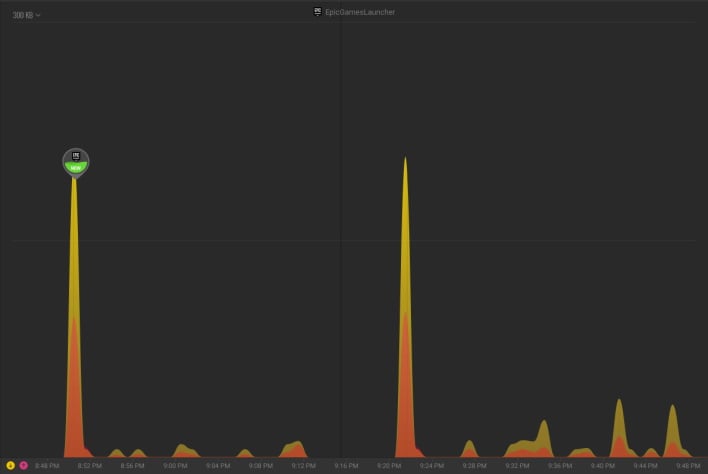
>Doing some testing on another personal machine, we noticed that the Epic Games Launcher has five different processes open at one time. Out of curiosity, we opened up Glasswire, which is a free network traffic monitor. We could see that the Epic Games Launcher and associated processes were firing off data at regular intervals to over 22 different servers. This was happening whether we had the launcher open, minimized, or in the background. The larger spikes shown in the Glasswire graph below are from when we reopened the Epic Games launcher after closing it.
https://images.hothardware.com/contentimages/newsitem/53798/content/small_epic-games-glasswire.jpg
Looks like Epic's doing exactly what everyone (sane) thought it was going to do. It's sending 14x the data that Steam and GeForce Experience normally collects in a similar time frame to the following URL:
tracking-website-prod07-epic-961842049.us-east-1.elb.amazonaws.com
They're not sure if this is causing the CPU spike, but they can't rule it out either.
The comments section on the article had the best take on the matter.
>when something is free you are the product ~ Gregg
As if you needed another reason to hate China's gaming honeypot, it appears the launcher is using up a massive amount of resources even when you aren't doing anything with it.
As reported by Hot Hardware:
>>Though Epic Games is giving away games for Christmas, not everything that seems free truly is. Either by lousy design, stealthy data collection, or a combination of the two, the Epic Games Launcher appears to be continuously running some sort of relatively demanding process in the background. This issue is so pronounced that a Reddit user by the name Neoncarbon noticed that his AMD Ryzen 7 5800X idle temps dropped from 50C to 37C when he closed down the app. We actually proved this out for ourselves as well, as you'll see in the screen shots below. What's odd is that other game store apps, like GOG and Steam, do not show this behavior at all. What exactly could Epic Games Launcher be doing in the background that is elevating CPU temps even while idle, when other launchers do not have this issue?
Responding to a Reddit post where users were complaining of a 20 degree spiking in their CPU temperatures, Hot Hardware tested the issue with their own systems and found similar problems. They proceeded to investigate the source of the CPU usage and found this little gem.
>>Doing some testing on another personal machine, we noticed that the Epic Games Launcher has five different processes open at one time. Out of curiosity, we opened up Glasswire, which is a free network traffic monitor. We could see that the Epic Games Launcher and associated processes were firing off data at regular intervals to over 22 different servers. This was happening whether we had the launcher open, minimized, or in the background. The larger spikes shown in the Glasswire graph below are from when we reopened the Epic Games launcher after closing it.
https://images.hothardware.com/contentimages/newsitem/53798/content/small_epic-games-glasswire.jpg
Looks like Epic's doing exactly what everyone (sane) thought it was going to do. It's sending 14x the data that Steam and GeForce Experience normally collects in a similar time frame to the following URL:
**tracking-website-prod07-epic-961842049.us-east-1.elb.amazonaws.com**
They're not sure if this is causing the CPU spike, but they can't rule it out either.
The comments section on the article had the best take on the matter.
>>when something is free you are the product ~ Gregg


(post is archived)